Yes, CapCut’s Free Tier Is Still Genuinely Usable
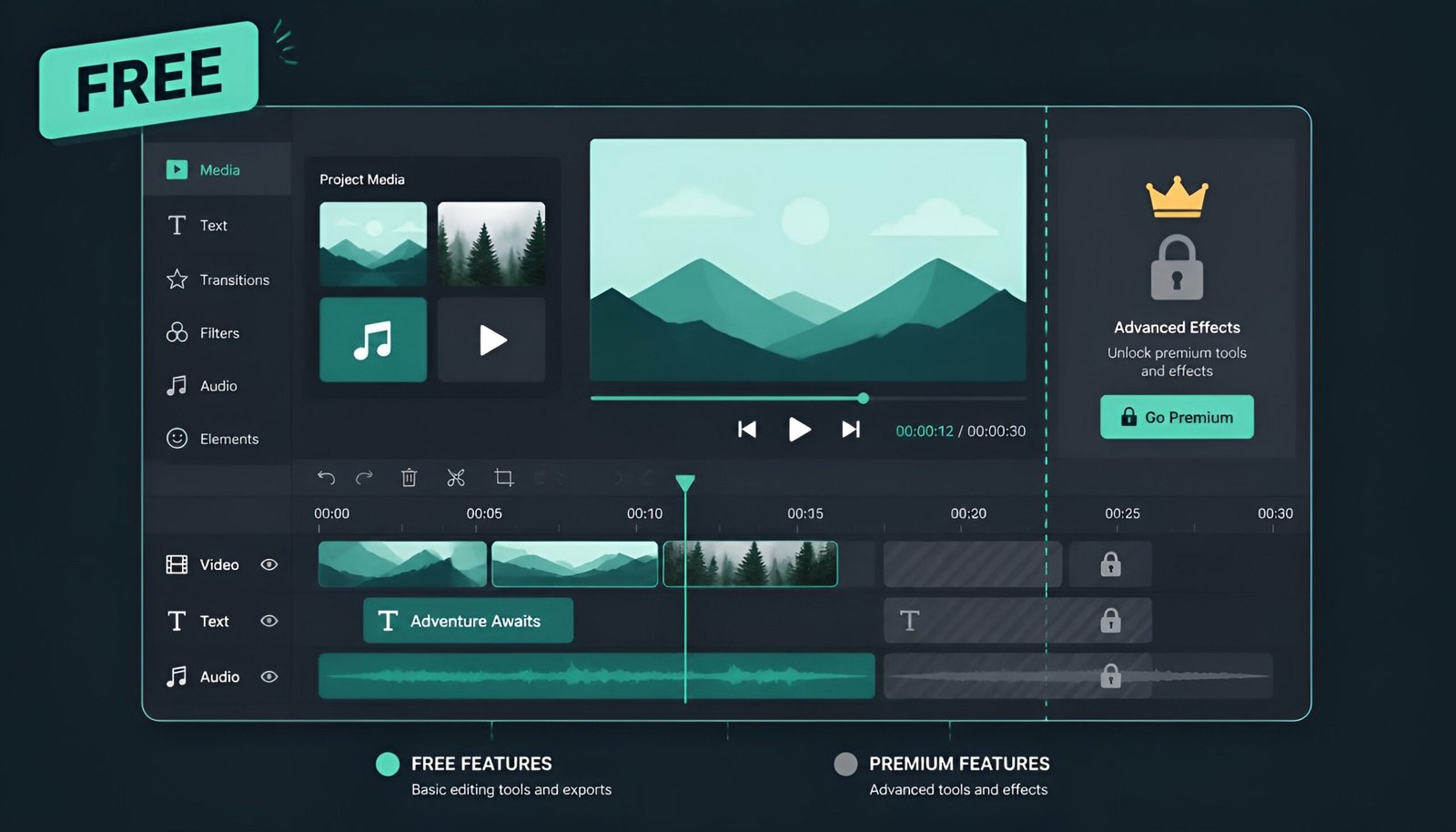
CapCut got a major price restructure in early 2026, and the free tier lost some things it used to have – most notably, free cloud storage disappeared entirely. But the core editor itself is still free: cutting, transitions, captions, basic effects, and exporting your own footage all work without paying anything, and without a watermark on a normal edit.
The trick is knowing exactly which features quietly require Pro, so you don’t get stuck mid-edit expecting something free that isn’t – and knowing how to back out cleanly if you already subscribed and want to stop paying.
What’s Actually Free in CapCut (2026)
- Core video editing – cutting, trimming, splitting, layering
- Most transitions and basic effects
- Auto captions and text-to-speech
- Exporting your own footage at 1080p with no watermark, as long as you’re not using a Pro-locked template
- Most templates (some are Pro-exclusive – see below)
What Requires Pro or Standard
- Cloud storage – free accounts get 0GB as of the 2026 restructure; any cloud-saved project space requires a paid plan
- Watermark-free use of premium/Pro-locked templates – the free tier can still use these templates, but the export carries a watermark unless you’re on Standard or Pro
- Watermark-free AI-generated clips – certain AI tools (text-to-video, avatars, voice cloning) add a watermark on free exports
- 4K and HDR export – free tier is capped at 1080p
- Commercial-use templates – some templates are licensed for personal use only on the free tier
The simplest rule: if you’re editing your own footage with standard tools and non-Pro templates, your export is watermark-free on the free tier. The watermark only shows up when you lean on a Pro-locked template or certain AI-generated content without subscribing.
How to Use CapCut for Free Without Paying for Cloud Storage
Since free accounts no longer get any cloud storage, the workaround is simple: export finished projects to your device or a separate free cloud service (Google Drive, iCloud) instead of relying on CapCut’s own cloud. Keep in-progress projects on-device rather than syncing them, and CapCut’s free tier remains fully workable for regular editing.
Already Subscribed to Pro? Here’s How to Cancel
Even if you know how to use CapCut for free, some people end up subscribed anyway – often by accident through a trial. Deleting the CapCut app does not cancel your subscription. This is the single most common reason people keep getting charged month after month – they uninstall the app thinking that’s the end of it, and the billing keeps running quietly in the background.
CapCut Pro is billed by whichever platform you signed up through – Apple, Google Play, or CapCut’s own website. You have to cancel through that specific platform. Uninstalling the app does nothing to the billing agreement itself.
CapCut Pro currently runs $19.99/month (or $179.99/year) through the website, and $21.99-22.99/month through app store purchases due to platform fees – so getting the cancellation right matters.
First – figure out where you subscribed.
Signed up in the iPhone app? → Cancel through Apple ID Settings
Signed up in the Android app? → Cancel through Google Play
Signed up on capcut.com in a browser? → Cancel through your CapCut account
Method 1: Cancel on iPhone (Apple Billing)
- Open Settings on your iPhone
- Tap your name at the top
- Tap Subscriptions
- Find CapCut in the list and tap it
- Tap Cancel Subscription in red text
- Confirm
If you only see a “Renew” option instead of “Cancel Subscription,” it means your subscription is already cancelled and won’t renew.
Method 2: Cancel on Android (Google Play)
Deleting the CapCut app on Android is especially misleading – the app disappears from your phone but Google Play keeps billing you on schedule.
- Open the Google Play Store app
- Tap your profile picture in the top right corner
- Select Payments & subscriptions
- Tap Subscriptions
- Find CapCut in the list
- Tap Cancel subscription and follow the confirmation prompts
If CapCut isn’t showing in your subscriptions list, check that you’re logged into the Google account you originally used to subscribe – it’s easy to have more than one account on a phone.
Method 3: Cancel on PC (CapCut Website)
If you subscribed directly through capcut.com using a credit card, your billing is handled through CapCut’s own system rather than Apple or Google.
- Go to capcut.com and log in
- Click your profile icon in the top right corner
- Select Settings or Account
- Look for Subscription or Billing in the menu
- Click Cancel Subscription or Turn off Auto-renewal
- You may be asked for a reason – select anything and confirm
- Check your email for a cancellation confirmation
What Happens After You Cancel
- Your Pro features stay active until the end of your current billing period – cancelling doesn’t cut off access immediately
- Your videos and projects are not deleted – everything stays in your account
- Exports using Pro-locked templates or AI-generated clips will carry a watermark again once Pro expires – your own footage edited with standard tools stays watermark-free
- Pro-only effects and filters in existing drafts become locked – you’ll need to remove them or re-subscribe to export those specific projects watermark-free
- Any project relying on cloud storage may become inaccessible once your paid storage plan lapses, since free accounts get 0GB – back up anything important locally first
- The free CapCut tier remains fully usable for basic editing, transitions, and captions
⚠️ Before your billing period ends: Export any videos that use Pro-only templates, effects, or AI-generated clips, and move anything sitting in cloud storage to your device. Once Pro expires, those specific exports pick up a watermark again unless you resubscribe, and cloud-stored files may become inaccessible.
Can You Get a Refund?
CapCut treats subscriptions as virtual goods, which means standard refunds for “I forgot to cancel” are rare. That said, there are two situations where you do have a real shot.
The 14-Day Refund Window
According to CapCut’s Terms of Service, you can cancel with a full refund within 14 calendar days of starting your subscription – but only if you have not used the Premium Services at all since subscribing. If you’ve edited even one video with a Pro feature, this window typically doesn’t apply.
To request this refund, contact CapCut support directly at support@us.capcut.com.
If You Subscribed Through Apple or Google
CapCut does not process refunds directly for App Store or Google Play purchases – you have to go through the platform that billed you.
Apple refund request:
- Go to reportaproblem.apple.com
- Sign in with your Apple ID
- Select the CapCut transaction
- Choose a reason and submit
Apple typically processes refund requests within 5-10 business days and tends to approve subscription refunds requested within 14 days of the charge.
Google Play refund request:
- Open Google Play Store – tap your profile icon
- Go to Payments & subscriptions – View purchases
- Find the CapCut charge
- Tap Request a refund
Google generally refunds within 48 hours if requested within 48 hours of the charge. Requests made later are handled case-by-case and are far less likely to succeed.
Quick Reference
Whether you’re sticking with the free plan or cancelling a paid one, here’s the fast version.
| Where you subscribed | How to cancel | Who handles refunds |
|---|---|---|
| iPhone App Store | Settings – Apple ID – Subscriptions | Apple (reportaproblem.apple.com) |
| Android Google Play | Play Store – Payments & subscriptions | Google Play refund portal |
| capcut.com (web/PC) | Account settings on the website | CapCut support directly |
Frequently Asked Questions
Is CapCut still free to use in 2026, without a watermark?
Yes, for standard editing of your own footage. A plain manual export – cutting, trimming, arranging your own clips – carries no watermark on the free tier. The watermark only appears if you use a Pro-locked template or certain AI-generated clips without subscribing to Standard or Pro.
Does deleting the CapCut app cancel my subscription?
No. This is the most common mistake people make. Deleting the app removes it from your device but does nothing to stop the recurring billing. You must cancel through the specific platform – Apple, Google Play, or your CapCut web account – that you used to subscribe.
Will I lose my videos if I cancel CapCut Pro?
Your projects stay in your account, but anything relying on cloud storage may become inaccessible once you’re back on the free tier’s 0GB allowance. Export and back up cloud-stored projects locally before cancelling. Pro-locked templates and AI-generated clips in drafts also pick up a watermark again unless removed or re-subscribed.
Can I get a refund for CapCut Pro?
It depends on timing and usage. If you cancel within 14 days of subscribing and haven’t used any Premium features, you qualify for a full refund through CapCut support. After that window, refunds are rare and must go through Apple or Google if that’s who billed you – and even then approval isn’t guaranteed.
How much does CapCut Pro cost now?
As of the early 2026 price restructure, Pro runs $19.99/month or $179.99/year through the CapCut website, and typically $21.99-22.99/month through app store purchases due to platform fees. A cheaper Standard tier at $9.99/month unlocks additional templates and effects without a watermark, without Pro’s full feature set.
Final Thoughts on Using CapCut for Free
For most casual editing, CapCut’s free tier still gets the job done watermark-free, as long as you stick to standard templates and your own footage – the 2026 changes mostly hit cloud storage, premium templates, and AI tools, not the core editor. If you already subscribed and want out, cancelling takes about 2 minutes once you know whether Apple, Google, or CapCut itself is billing you. If you’re also managing other app subscriptions, our guide to free VPN options for Windows is a good next stop for trimming recurring costs elsewhere.
Tested on: iOS 18.4 · Android 15 · CapCut Web – Updated August 2026
Tags: CapCut, CapCut Pro, cancel subscription, free video editor, CapCut pricing, app subscriptions