
Windows Keeps Telling You Virus Protection Is Off – But It Isn’t
If you’ve gotten a persistent notification saying “Turn on Virus Protection – Virus protection is turned off” after installing this month’s Windows update, you’re not alone, and more importantly, you’re probably not actually at risk. This is a confirmed display bug tied to the August 2026 cumulative updates, not a real security problem, but it’s worth walking through how to tell the difference and how to make the notification stop.
The bug traces back to a UI rendering issue introduced alongside KB5121003 and the related optional update KB5120998. Something in how Windows Security’s notification system checks and reports its own status got scrambled in this update, so it fires an alert that doesn’t match what’s actually happening underneath.
Virus Protection Off Notification: How to Confirm It’s a False Alarm
Open Windows Security directly – press the Windows key, type “Windows Security,” and open the app rather than relying on the notification banner. Go to Virus & threat protection. If real-time protection, cloud-delivered protection, and automatic sample submission all show as on and everything in the dashboard looks green rather than flagged in red or yellow, your protection is genuinely active. The notification is lying to you; the dashboard itself is telling the truth. Other users have confirmed the same false alarm on Microsoft’s own Q&A forum, running PowerShell diagnostics that showed protection fully active despite the notification.
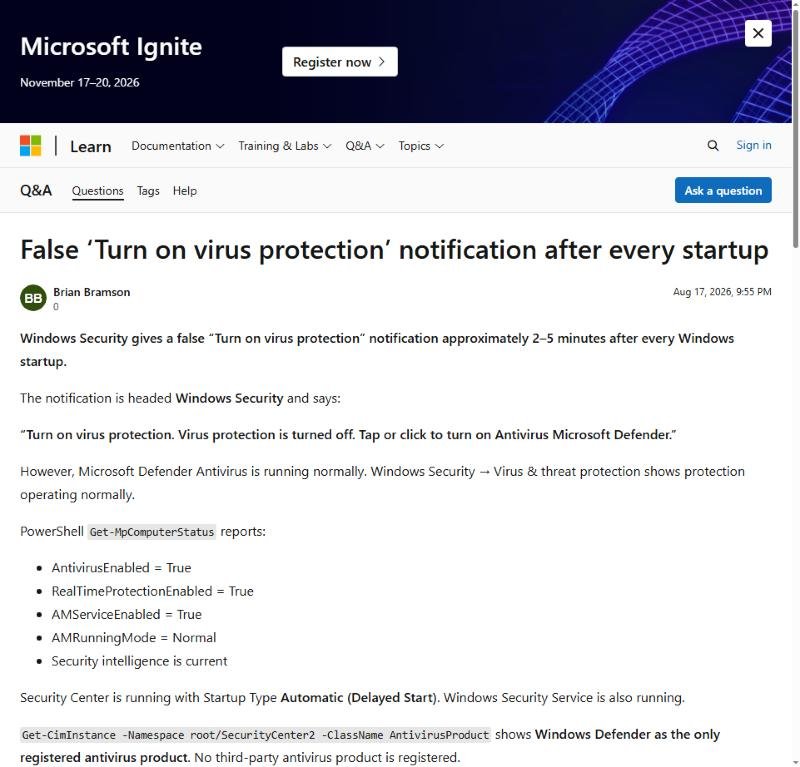
A user’s Microsoft Q&A report confirming the false alarm with PowerShell diagnostics
This distinction matters because it’s tempting to “fix” a phantom problem by toggling settings off and back on, which can occasionally introduce a real gap in protection where none existed before. If the dashboard already shows everything active, resist the urge to touch anything in that panel.
Making the Notification Stop
Since this is a display bug rather than an actual protection failure, the practical fixes are about clearing the false notification rather than restoring protection that was never actually lost.
Start with a restart of the Security Center service, since notification bugs like this often trace back to a stuck background process rather than anything in the protection engine itself. Open Task Manager, find the Security Center or Windows Security Service process, and restart it. In many reported cases, this alone clears the false alert without needing anything more invasive.
If the notification returns after a restart, check Windows Update for a newer patch – Microsoft has a pattern of quietly fixing UI bugs like this within a few weeks of introducing them, and by the time you’re reading this there’s a reasonable chance a fix has already shipped as a follow-up cumulative update. Installing any pending updates is worth doing before trying more manual fixes.
When You Should Actually Worry
The line between “annoying false alarm” and “something is actually wrong” comes down to what the Virus & Threat Protection dashboard itself shows, not what the notification banner claims. If the dashboard shows a genuine red flag – real-time protection actually toggled off, a threat actually detected and unresolved, or a definitions update that’s actually failing – that’s different from this specific bug, and worth addressing directly rather than assuming it’s the same false alarm everyone else is seeing this month. Most people seeing the virus protection off notification this month are dealing with the same display bug, not an actual gap in coverage.
This same gap between what a Windows notification claims and what’s actually happening under the hood shows up in the Local Security Authority protection warning, another case where the visible alert doesn’t match the real system state underneath it.
Affects: Windows 11 24H2, 25H2 after KB5121003/KB5120998 – August 2026
Tags: windows security false virus protection off notification, kb5121003 windows security bug fix, windows 11 turn on virus protection notification wrong